
To remove a bad Google review, report it from your Business Profile and pick the Google rule it breaks. You cannot delete it yourself, and Google removes it only if it breaks a rule or the law.
A real customer's honest complaint usually stays up. Your best move then is a short, calm reply.
In short:
| Your situation | What to do |
|---|---|
| The review breaks a Google rule | Report it |
| Google said no | Appeal once, with proof |
| Someone wants money to remove it | Do not pay. File Google's extortion form |
| It is a real complaint | Reply and fix the problem |
| You wrote the review | Delete it from your Google Maps account |
Can You Delete Google Reviews About Your Business?
No. The button you get is Report, not Delete. The writer can edit or delete it, and Google can remove it.
Google's report page says you can report any review, but only ones that break its policies can be removed.
It also says not to report a review just because you disagree. Google says it stays out of conflicts between businesses and customers.
Which Reviews Will Google Remove?
The rules come from Google's list of banned content, read November 28, 2026. The examples are made up, and the proof column is my suggestion.
| Google rule, and what it can look like | Proof to save |
|---|---|
| Fake engagement: someone who never contacted you describes a job | Search of calls, texts and job calendar |
| Conflict of interest: a rival, a former employee or their relative posts | Anything that shows the tie |
| Incentivized review: the writer was paid or given a discount to post | The offer, in writing |
| Off-topic: a political rant, not a visit or job | Screenshot of the review |
| Harassment: a threat against your technician | Screenshot, with the date |
| Hate speech: an attack on a race, religion or other protected group | Screenshot, with the date |
| Personal information: a worker's full name posted without consent | A note that the worker did not agree |
| Profanity: curse words aimed at your staff | Screenshot of the review |
| Advertising: a link or phone number in the review | Screenshot of the link or number |
| Repetitive content: the same text posted again, or from two accounts | Both copies, side by side |
| Offensive content: "They are criminals," with nothing to back it | Records that answer the claim |
Search before you call it fake. Check calls, texts and estimates, not only invoices. In my reading, a person who only got a quote may still have had a real experience.
Names have an exception. A name is allowed if it is part of the business name. It is also allowed for a public-facing professional working under that name, and Google lists contractors.
These reviews usually stay: a low rating you think is unfair, a price complaint, or a bad experience described respectfully.
How Do You Report a Google Review?
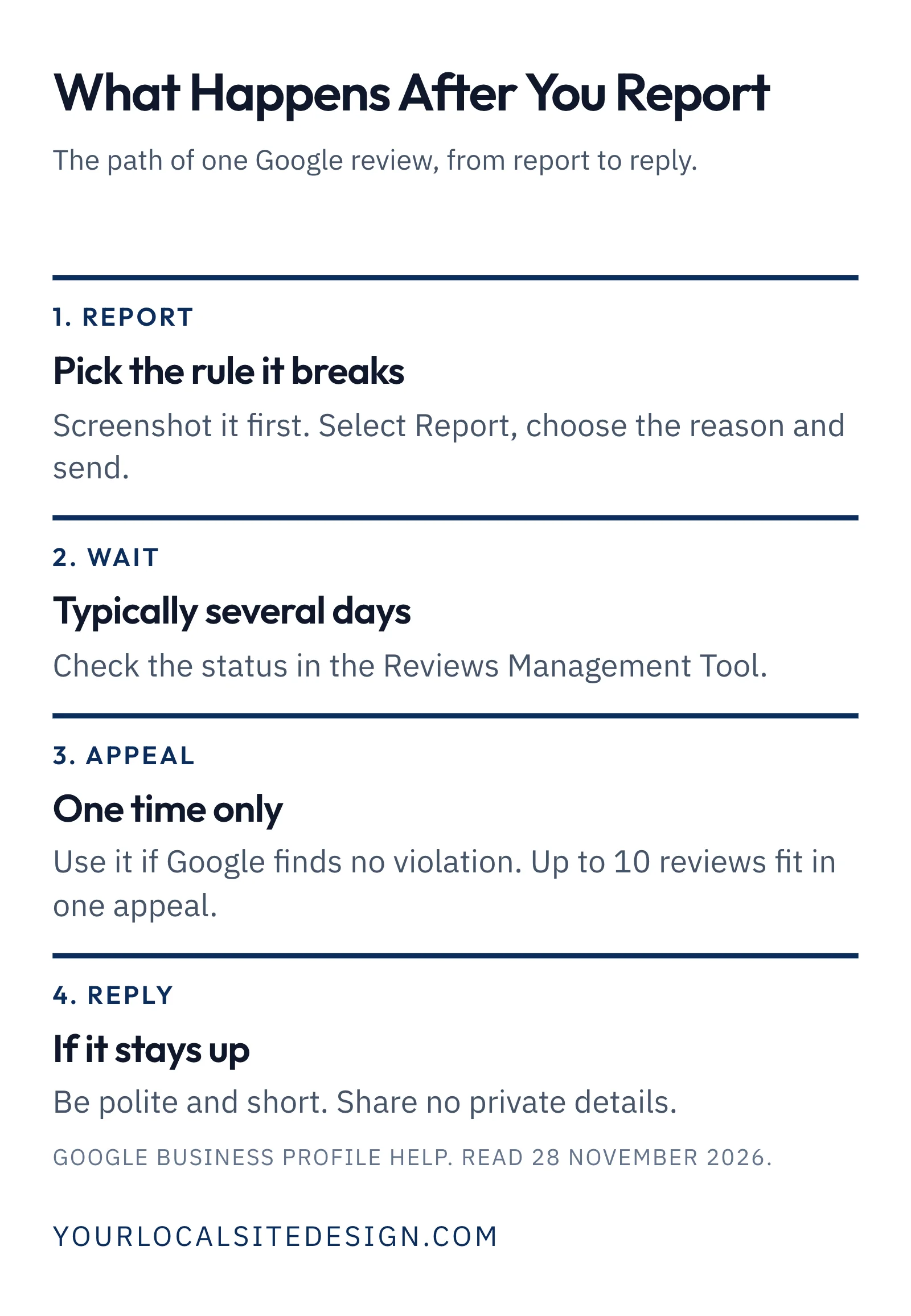
Before you report, take a screenshot. Note the reviewer's name, the date and the rule it breaks.
- Go to your Business Profile.
- Select Read reviews.
- Next to the review, select Report.
- Pick the reason, such as "Spam" or "Profanity".
- Select Send report.
Pick the reason that truly fits. Google says evaluation typically takes several days.
You can also report and track reviews in Google's Reviews Management Tool.
| Status in the tool | What it means |
|---|---|
| Decision pending | Flagged, but not evaluated yet |
| Report reviewed - no policy violation | Google found no broken rule. You can appeal once |
| Escalated - check your email for updates | You appealed. Read the email for the result |
If one account is the problem, you can report the reviewer's profile too. In the Maps app, tap Business, then Reviews, then the person's name, then More and Report.
What If Google Says No to Removing the Review?
You get one appeal for that review. Gather your proof before you start.
- Open the Reviews Management Tool and confirm your Google account.
- Pick your business and select Continue.
- Choose Check the status of a review I reported previously and appeal options, then Continue.
- Select Appeal eligible reviews and pick the review. You can pick up to 10.
- Select Continue, then Submit an appeal. Fill in the form and send it.
Stick to facts. This is the note I would write:
The review by [name], dated [date], breaks your [rule name] policy. [One fact that shows it.] Attached: [your proof].
Here is a fact for a fake job claim: "Our call log, texts and job calendar show no contact with this name."
Google emails the result. Do not judge by the status alone. Google's help page says "Escalated" also shows on an appealed review that stays live.
If you think the review breaks the law, Google has a separate legal removal route. Talk to a lawyer first. I am not one.
What If Someone Demands Money to Remove Reviews?
This is a known scam. First comes a sudden rise in 1-star and 2-star reviews. Then someone demands money, goods or services to remove them.
Google says do not engage and do not pay. Paying can invite more attempts and does not guarantee removal.

- Screenshot every message, with the date, time and sender.
- Copy a link to each suspicious review.
- Write down when the reviews started and when the demand came.
- File the merchant extortion report form, linked on that Google page. Add your role, business name, address and profile link.
The form is only for cases where someone has made a demand for money or favors.
For reviews that break other rules, use the normal Report button. Sterling Sky, an SEO company, advised in September 2026 flagging each fake review and reporting the profiles.
How Do You Respond to a Negative Review?
Write for the next customer who reads it. Google's reply tips include: be polite, be short and protect privacy. For hard cases, ask the person to call or email.
Do not post their address, invoice or phone number. Do not argue.
Copy one of these and change the parts in brackets.
A real complaint
[Name], I am sorry we let you down. You are right about [the thing that went wrong]. Please call me at [your phone] so I can make it right. [Your name]
Part of it is wrong
[Name], I am sorry you were unhappy. Our records show [one plain fact]. I want to hear your side. Please call me at [your phone]. [Your name]
You cannot find them as a customer
[Name], I cannot find a job under your name. Please call me at [your phone] so I can check. If we made a mistake, I want to fix it. [Your name]
Angry, with no details
[Name], I am sorry to see this. I do not know what happened yet. Please call me at [your phone] and tell me. [Your name]
Your business must be verified to reply. Google checks each reply, usually in up to 10 minutes, though it can take up to 30 days.
The reviewer is told you replied, and they can change their review. After you fix the problem, you can ask them to update it. Offer nothing in return.
What Should You Never Do About a Bad Review?
| Do not | Why |
|---|---|
| Pay or discount to get it changed or removed | Google bans it |
| Post fake 5-star reviews | Banned by Google and by a federal rule |
| Have family or staff post reviews to bury it | Google lists family and job ties as conflicts of interest |
| Ask only happy customers for reviews | Google bans picking them out this way |
| Give your crew a review quota, or have them ask to be named | Google's rules say not to |
| Threaten the reviewer | A federal rule bans groundless legal threats and intimidation |
| Ban honest reviews in your customer contract | A federal law makes that illegal |
The federal rule on reviews took effect October 21, 2024. Its text covers fake reviews, rewards tied to a good or bad opinion, and review suppression.
Google can also restrict your profile for fake engagement. It may block new reviews or unpublish old ones for a set period, or show customers a warning.
How Many 5-Star Reviews Cancel a 1-Star Review?
At 4.8 stars, it takes 19 five-star reviews. At 4.5 stars, it takes 7. That gets your exact average back after one 1-star review.
Google says your score is the average of all your ratings. My formula is (old rating minus 1) divided by (5 minus old rating), rounded up.
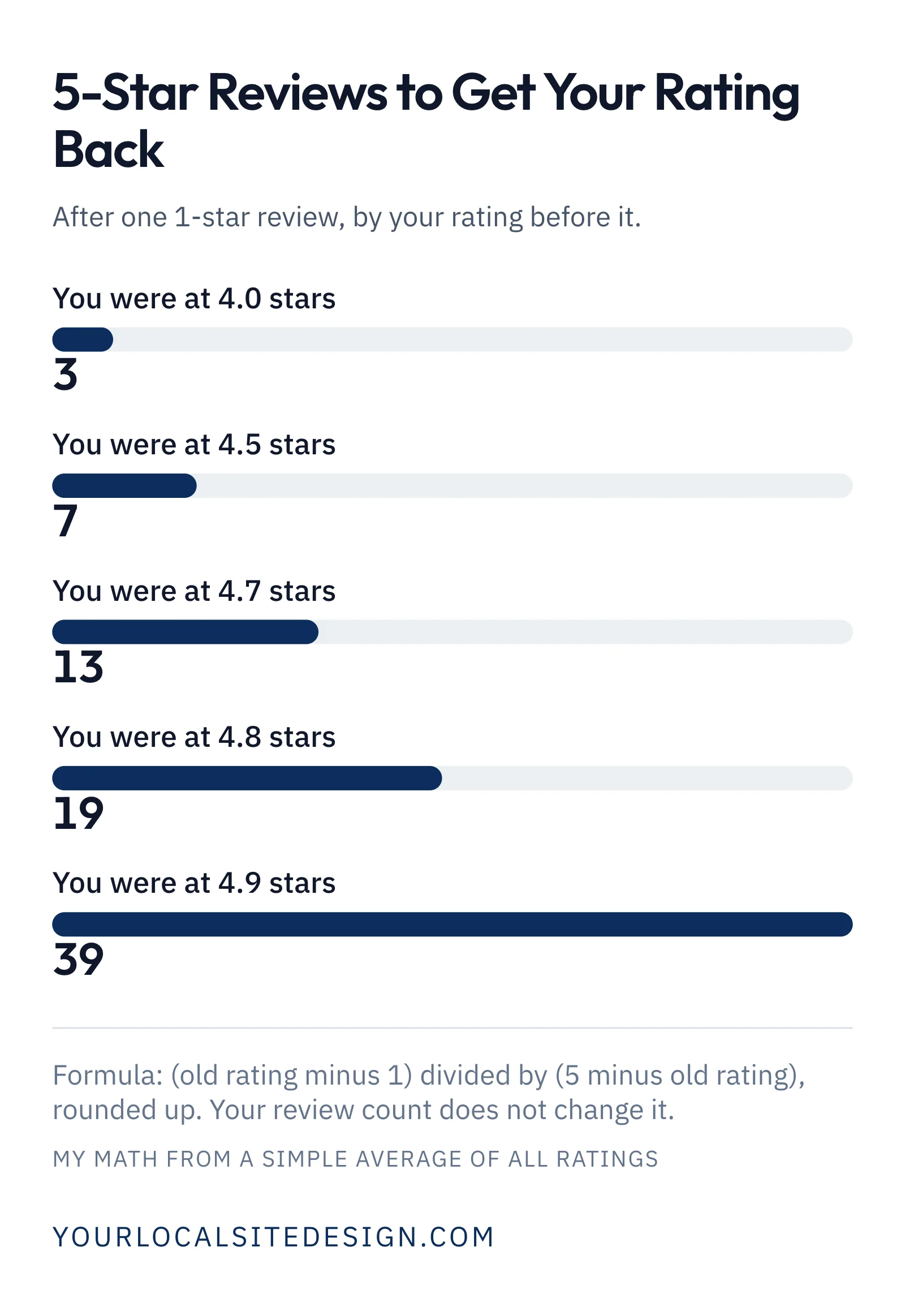
| Rating before the bad review | 5-star reviews to get it back |
|---|---|
| 4.0 | 3 |
| 4.5 | 7 |
| 4.7 | 13 |
| 4.8 | 19 |
| 4.9 | 39 |
Your review count does not change these numbers. At 4.8, two 1-star reviews need 38. A perfect 5.0 average cannot be fully won back.
At 4.8, adding one 5-star review a week means 19 weeks to recover. How to get more Google reviews has the ask and the text I use.
How Far Does One 1-Star Review Drop Your Rating?
Your review count decides this part. The more reviews you have, the less one hurts.
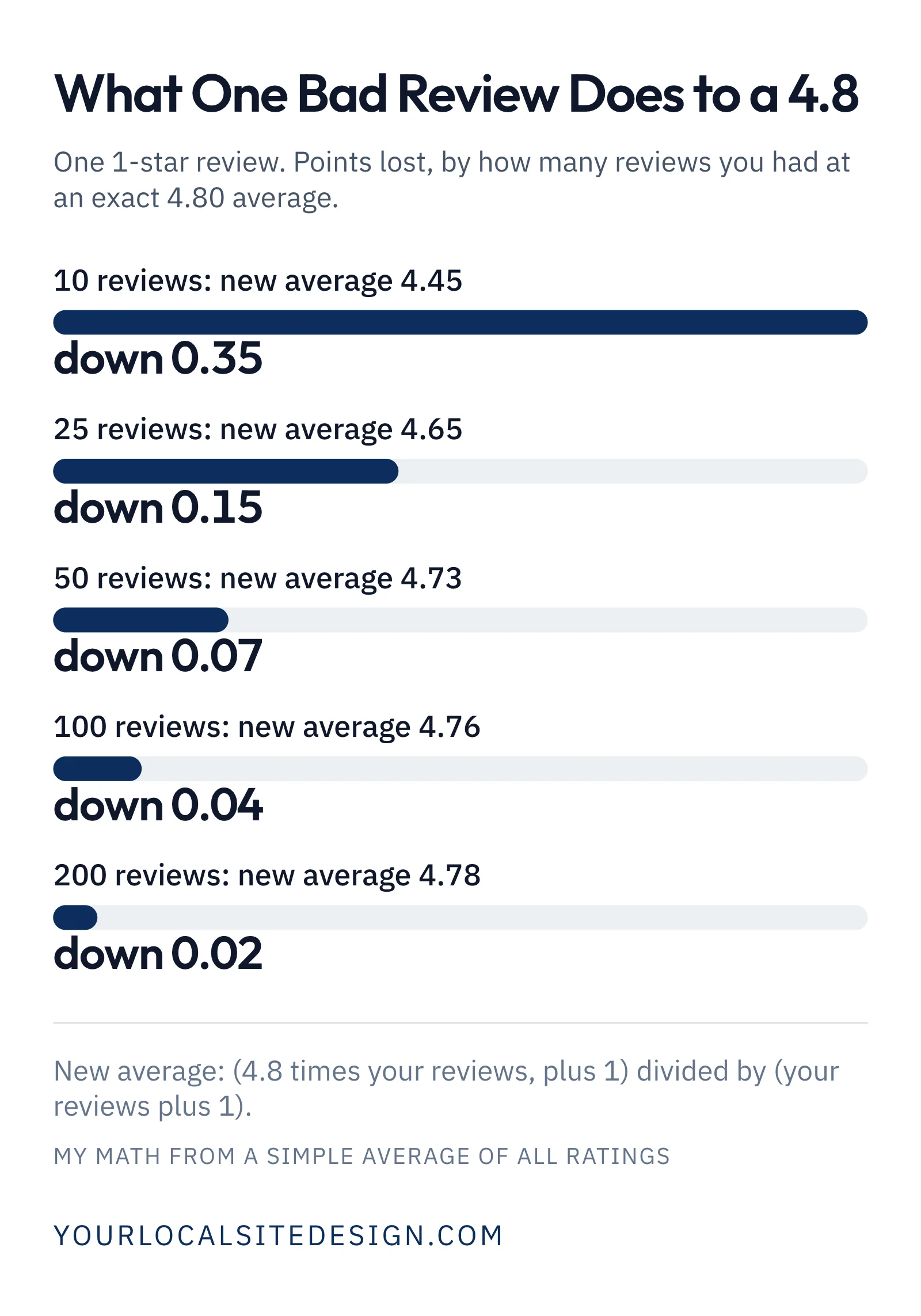
| Reviews you had at 4.80 | New average | 5-star reviews to get above 4.75 |
|---|---|---|
| 10 | 4.45 | 14 |
| 25 | 4.65 | 11 |
| 50 | 4.73 | 6 |
| 100 | 4.76 | Already above |
| 200 | 4.78 | Already above |
Why 4.75? An average above it rounds to 4.8 at one decimal place. Google's score page does not say how it rounds, so treat the last column as an estimate.
Google says a new review may take up to two weeks to change your score.
Should You Pay a Company to Remove a Review?
Google makes the call, whoever sends the report. Report and appeal it yourself first.
| If | Then |
|---|---|
| You cannot name a rule it breaks | Do not pay for removal. Reply instead |
| You can name the rule | Report it, then appeal with proof |
| You think it breaks the law | Ask a lawyer about the legal route |
If you still want help, ask these first:
- Which Google rule does this review break?
- How will you report it?
- What do I pay if it stays up?
- Will you post anything under my name or my customers' names?
Walk away if they cannot name a rule, or offer new 5-star reviews they supply. Walk away from threats too. The federal rule on threats applies to anyone.
Do not let them pay the reviewer either. Google bans it, and FTC staff say paying to change a truthful bad review may break federal law.
How Do You Delete a Google Review You Wrote?
On a computer (Google's steps):
- Open Google Maps and select the Menu.
- Select Your contributions, then Reviews.
- Select More next to the review.
- Select Delete review and follow the steps.
On an iPhone or iPad (Google's steps):
- Open Google Maps and tap Contribute.
- Tap View your profile, then scroll to See all reviews.
- Tap More next to the review.
- Tap Delete review and follow the steps.
You can choose Edit review instead. An edited review shows the date of your last edit.
What I Checked and What I Did Not
I read the linked Google help pages, the federal rule and the FTC guidance on November 28, 2026. I worked out the rating math myself.
I did not measure how often Google removes a reported review. The Google pages I read give no removal rate and no appeal time.
Menus change, so check the linked page if a button has moved. This is not legal advice.
If your profile has more problems than one review, start with the Google Business Profile guide for contractors. I also do local SEO for service businesses.
Want to see how your reviews compare with the companies above you? Ask for a free competitor teardown, or see my Google Business Profile management.